How to Optimize Your Next.js Application for Performance and Scalability

Next.js is an incredibly powerful React framework that brings server-side rendering, static site generation, and API routes into one toolkit. However, as your application grows, performance bottlenecks and scalability issues can creep in if you're not careful. Here's a guide to optimizing your Next.js application for speed, scalability, and great user experience.
1.Enable Image Optimization
Use Next.js’s built-in </Image> component instead of <img> for automatic image resizing, lazy loading, and WebP support.
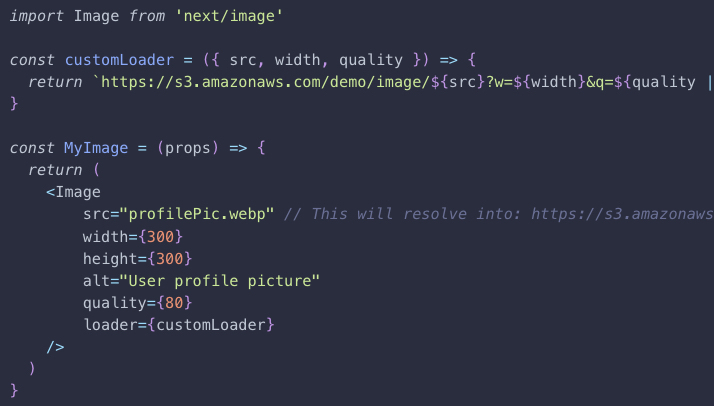
2.Server-Side Rendering (SSR) in Next.js
Server-Side Rendering (SSR) means that your page is rendered on the server for every request. Unlike Static Site Generation (SSG), which generates HTML at build time, SSR renders HTML dynamically when a user visits the page.
Use SSR when you need to fetch fresh, dynamic data on every request and you care about SEO or initial load speed.
You can enable SSR in Next.js by using the getServerSideProps function in your page component.

Use SSR when
Content must be always up-to-date
Page relies on authentication or user-specific data
You’re building a dashboard, admin panel, or user profile
You can’t pre-generate content at build time
Avoid SSR if
Data doesn't change often → Use SSG (Static Site Generation)
You can fetch data on the client without hurting SEO → Use CSR (Client Side Rendering) or SWR/React Query
You want to scale easily → SSR can become a bottleneck at scale
3.Dynamic Imports for Code Splitting
What is Code Splitting?
Code splitting means breaking your app’s JavaScript bundle into smaller chunks — instead of sending all your code to the browser on the initial load, you send only what’s needed for that page or interaction.
Load components only when needed to reduce the initial JS bundle size.
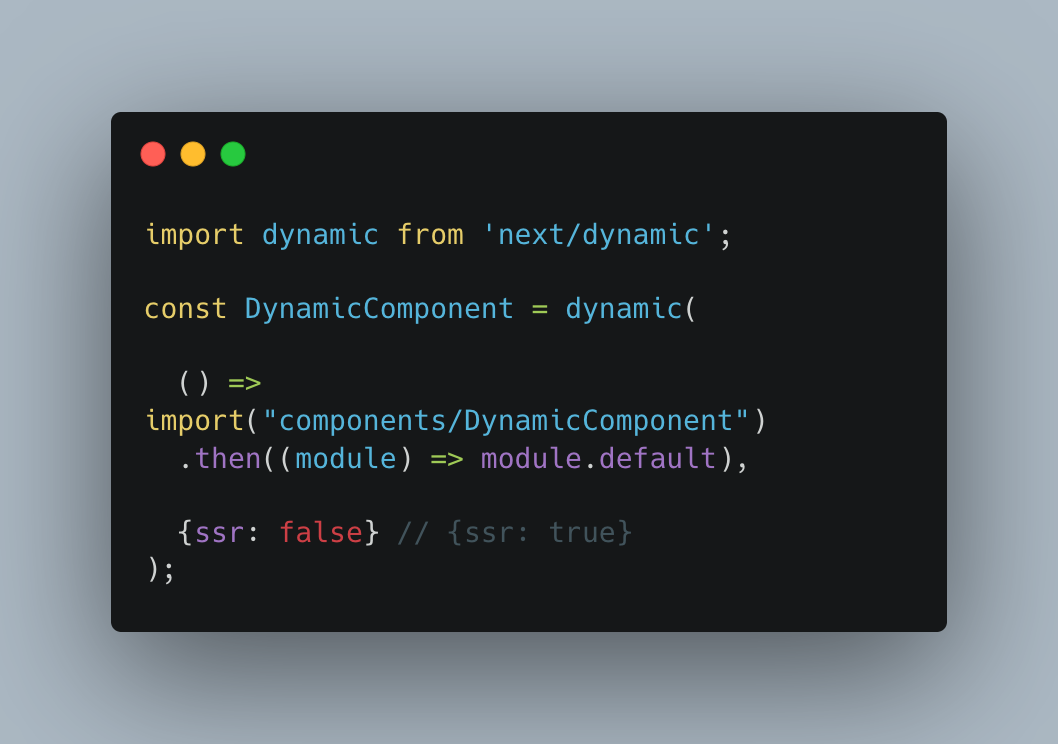
Now, DynamicComponent is not loaded during the initial render — it’s loaded only when that line of code is hit.
4.Optimizing Performance with useMemo and useCallback
Without useMemo, a heavy calculation will run on every render — even when it's unnecessary. This can slow down your app, especially in large components or when dealing with lots of data. useMemo helps you cache the result of an expensive calculation, so it only re-runs when its dependencies change.

useCallback is a React hook that remembers the function between renders unless its dependencies change. In Next Js, every render creates a new version of functions. If you pass these functions down to child components, it can cause unnecessary re-renders — even if nothing has really changed.
useCallback helps prevent this by keeping the function reference the same unless specific dependencies change.

5. Avoid Unused JavaScript and CSS
Remove unused imports and dead code.
6. Use Static Generation (SSG) Whenever Possible
Static generation is faster than server-side rendering because it builds HTML at build time. Pages that don’t change frequently (e.g., landing pages, blog posts) should use SSG.

7. Analyze Your Bundle Size
In Next.js, you can use the built-in next-bundle-analyzer plugin. Once you've analyzed your bundle, it’s time to optimize. Here are several strategies you can use
*Code Splitting
*Remove Unused Code
*Use Smaller or Modular Libraries
*Optimize Dependencies